Once you have comparable sessions at the same track, LapBrain lines up the available measurements so you can see what changed and what stayed similar. That turns separate debriefs into a history you can use before the next track day.
When it unlocks
Cross-session comparison requires at least two compatible sessions at the same track. LapBrain orders them by when you rode, and the comparison appears once both are available. You'll see a "NEW" badge the first time it's available.
What you'll see
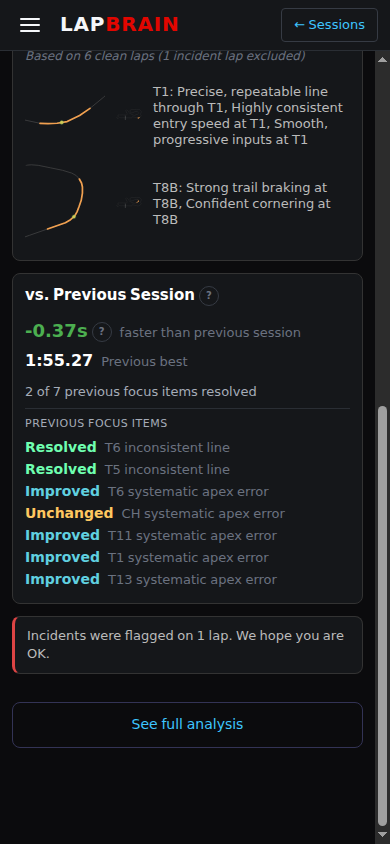
The cross-session view shows:
- Lap time trend: your best lap times across sessions in chronological order
- Corner-by-corner comparison: where pairwise measurements and time deltas changed
- Coaching threadCoaching threadAn issue followed across comparable sessions, such as entry-speed spread at T5 or section-time spread through the esses. history: when a trackable issue appeared, how its measurement changed, and its current status
Read the lap-time total beside the corner deltas. One lap pair may gain time in one region and lose it elsewhere; the selected laps and channels show where that trade occurred.
Coaching threads
A Coaching threadCoaching threadAn issue followed across comparable sessions, such as entry-speed spread at T5 or section-time spread through the esses. starts when LapBrain identifies an issue it tracks across sessions. If Session 1 shows entry-speed spread at T3, each later compatible session that checks entry-speed spread there extends the same thread.
Thread states:
- Active: the issue appears in the latest checked session
- Intermittent: the issue is absent from one or two checked sessions after appearing earlier
- Mastered: the issue is absent from three consecutive checked sessions
An Active thread may also show an Improving trend when its measurement moves toward the reference.
What to do next
- Inspect corner deltas beside lap times: use them to locate where the selected laps differ.
- Check your coaching threads: read the latest status and measurement for the issue you carried into the session.
- Add comparable sessions when you have them: a session extends a thread when LapBrain checks the same issue again.
- Explore Coaching Threads for a deeper look at how LapBrain tracks your progress over time.