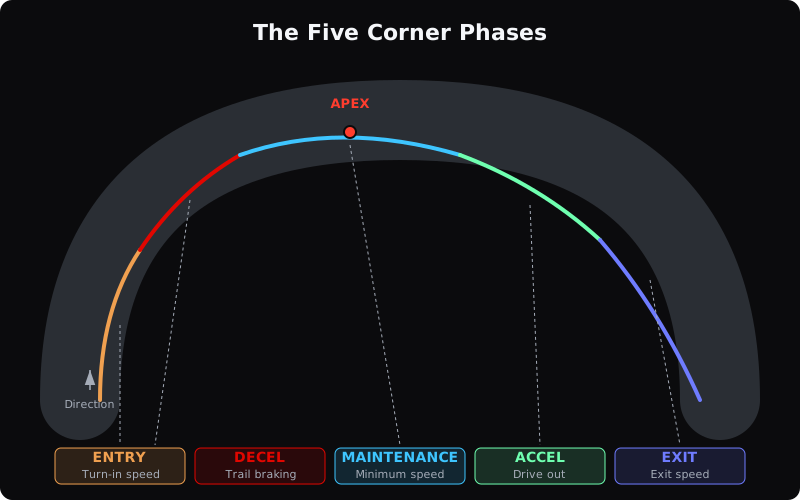
LapBrain divides each turn into five measurement phases. They give you a shared way to locate where two laps differ through a corner.
The five phases
Entry
The Entry phaseEntry phaseThe approach at the start of a turn, before its main measured deceleration region. is the approach at the start of the corner, before the main measured deceleration. LapBrain shows entry speed and the available trace data in that range.
What to compare: Entry speed, line, and recorded control channels across clean, comparable laps. A speed difference alone does not say which lap used the appropriate input.
Decel (Deceleration)
The decel phase is the part of the corner where measured speed is falling. If your data logger recorded brake pressure, that channel can show whether braking overlaps the turn; the speed trace alone cannot establish Trail brakingTrail brakingKeeping some brake pressure applied as the motorcycle begins changing direction into a corner. .
What to compare: Deceleration distance and rate, the time delta, line, and any recorded brake channel.
Maintenance
The Maintenance phaseMaintenance phaseThe middle portion of a turn where speed is roughly constant, between the end of deceleration and the start of acceleration. is the tightest part of the turn: near-constant speed between braking and acceleration. Your speed is at its lowest near the ApexApexAn inside reference point used to describe the shape and location of a cornering line. .
What to compare: Minimum speed, time in the phase, line, and repeatability. These measurements do not identify smoothness or available grip by themselves.
Accel (Acceleration)
The accel phase begins where measured speed starts increasing after the minimum-speed region. A recorded throttle channel can add input context; acceleration alone does not prove when or how the throttle opened.
What to compare: Acceleration, line, time delta, and recorded throttle data.
Exit
The Exit phaseExit phaseThe final part of a turn, connecting its measured acceleration region to the following track element. is the end of the corner. LapBrain shows exit speed and exit-drive measurements from the channels in your file.
What to compare: Exit speed, the following cumulative-time gap, line, and recorded control channels.
Why phases matter
The phases give measurements a shared location vocabulary. They tell you where in the corner a difference appeared: entry, deceleration, minimum speed, acceleration, or exit.
Use the colored phase segments to find where the difference appeared. Read the speed and time measurements beside the line and any recorded brake or throttle channels before deciding what changed between the laps.
Reading phase data in the app
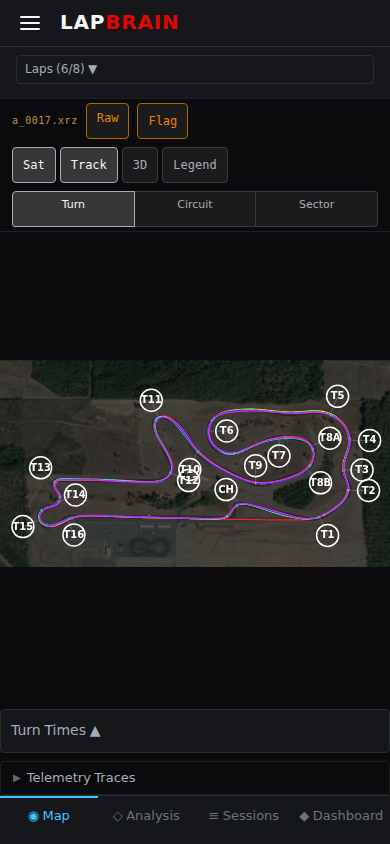
In the corner detail view, each phase is shown as a colored segment on the corner trace. The metrics table shows:
- Maintenance time: how long you spent at minimum speed
- Entry/Exit speed: speed at the start and end of the corner
- Min speed: your lowest speed near the apex
- Braking distance: how far you braked while turning
- Exit drive ratio: acceleration effectiveness out of the corner
What to do next
- Open a corner detail: tap any corner on your track map and look at the five phase segments.
- Compare two clean laps: where do the phase measurements differ, and where did the cumulative-time gap change?
- Read Understanding Coaching to learn how to turn phase data into on-track action.