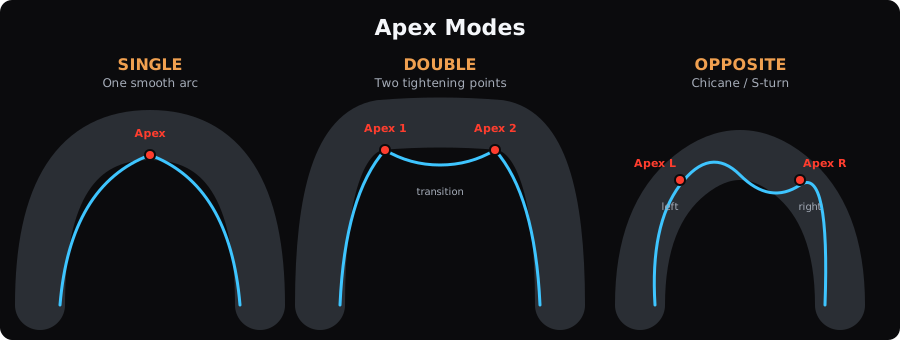
LapBrain classifies each turn as single, double, or opposite apex automatically. Its Apex modeApex modeThe type of apex a corner has: single (one inside point), double (two inside points with a brief straightening), or opposite (linked turns in opposite directions). tells you how many inside references to look for when you read the line and timing measurements. The mode organizes those references; it does not certify a target line or technique.
Single apex
Most turns use one inside reference. It helps line up lap traces and location measurements; it is not automatically the geometric midpoint, minimum-speed point, or a target you should hit.
The five turn phases follow one arc: Entry phaseEntry phaseThe approach at the start of a turn, before its main measured deceleration region. , decel, maintenance, accel, and exit.
Double apex
A double-apex corner is a longer turn with two distinct tightening points. You effectively ride two mini-corners within one turn, with a brief straightening or opening of the line between them.
You'll see two inside references in the corner analysis, one for each region.
Why it matters: A finding should name the sub-zone it came from. How you leave the first region also shapes the comparison through the second, so LapBrain can show each part and the linked sequence.
When a pairwise time gap changes in a double-apex turn, inspect the cited sub-zone and the transition between the two references. The trace locates the difference without identifying an unrecorded input or cause.
Opposite apex
An opposite-apex corner is a complex of two turns in opposite directions, like a chicane or S-turn. Each turn has its own apex, but the directions are reversed (left then right, or right then left).
LapBrain can compare each direction change separately and the linked complex as a whole. A measured difference in one part can alter the starting state of the next; that does not make one universal compromise line or priority correct for every lap.
How apex mode changes what you see
The same type of finding can point to a different part of the turn depending on its apex mode:
- In a single turn, the finding refers to one inside region.
- In a double turn, check which of the two sub-zones the finding cites.
- In an opposite turn, inspect both the cited sub-zone and the linked complex comparison.
Your corner detail view shows the apex mode so you can locate the references used by the measurement.
What to do next
- Check your track overview: look at which corners are marked as double or opposite apex
- Compare clean laps through double-apex turns: inspect each inside reference and the transition between them.
- Read Turn Phases for how the five phases apply within each apex mode