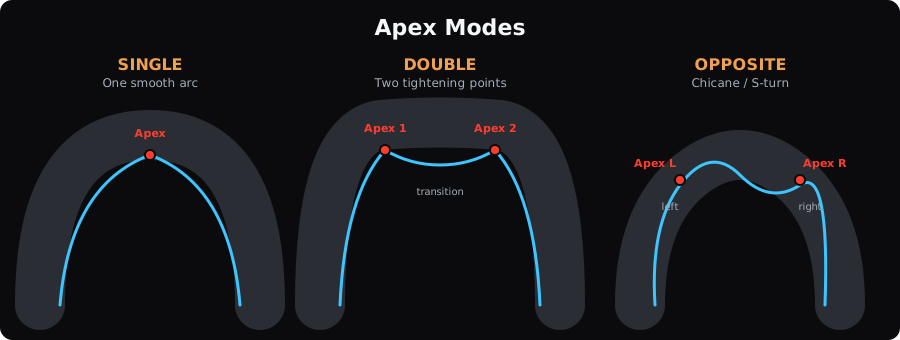
Every corner on a track has an Apex modeApex modeThe type of apex a corner has: single (one inside point), double (two inside points with a brief straightening), or opposite (linked turns in opposite directions). that describes its shape. LapBrain uses this to tailor how it analyzes your line and generates coaching recommendations.
Single apex
Most corners are single-apex turns — one smooth arc with one closest point to the inside of the track. You turn in, hit one apex, and drive out. The line through a single-apex corner is relatively straightforward: late apex for better drive, early apex for higher entry speed.
LapBrain's phase analysis works most naturally with single-apex corners. Your Entry phaseEntry phaseThe initial part of a turn where the bike transitions from straight-line travel into the corner, typically involving braking and the beginning of lean. , decel, maintenance, accel, and exit map cleanly to one arc.
Double apex
A double-apex corner is a longer turn with two distinct tightening points. You effectively ride two mini-corners within one turn, with a brief straightening or opening of the line between them.
These are common in long sweepers where the radius changes partway through. You'll see two separate apex points in your corner analysis.
Why it matters: The technique for a double-apex corner differs from two separate corners because the exit of the first tightening sets up the second. Rushing the first apex compromises your line through the second — so coaching recommendations account for the relationship between both points.
If you're losing time in a double-apex corner, look at the transition between the two apexes. Often the issue isn't the entry or exit but how you manage the brief opening between them.
Opposite apex
An opposite-apex corner is a complex of two turns in opposite directions — like a chicane or S-turn. Each turn has its own apex, but the directions are reversed (left then right, or right then left).
These require compromise lines. The fastest line through the first turn usually isn't compatible with the fastest line into the second. You sacrifice performance in one to gain it in the other. Which one to prioritize depends on what follows: if a long straight comes after, favor the exit of the second turn.
LapBrain detects apex mode from the track configuration and heading change data. You don't need to classify corners yourself — the system automatically applies the correct analysis for each corner's shape.
How apex mode affects coaching
The same coaching issue means different things depending on the apex mode:
- In a single corner, "improve trail braking" means one braking zone to optimize
- In a double corner, it might apply to either tightening point — check which apex the recommendation references
- In an opposite corner, the recommendation may involve trading performance between the two turns for a better overall time
Your corner detail view shows the apex mode for each turn so you always know what shape of corner the coaching is addressing.
What to do next
- Check your track overview — look at which corners are marked as double or opposite apex
- Compare your line through double-apex corners — are you treating them as one arc or riding the two tightening points separately?
- Read Turn Phases for how the five phases apply within each apex mode